How Security Consultants Use Attack Surface Intelligence to Scope Engagements and Find Vulnerabilities Faster
A prospective client sends you an email: “We need a security assessment for our company. Can you put together a proposal?”
You know the drill. Before you can even estimate the scope, you need to understand their external exposure. How many subdomains do they have? Are employee emails in breach databases? What technologies are running on their infrastructure? Is their domain spoofable? Are there leaked files with internal metadata?
So you open six different tools, run manual queries across each one, copy results into a spreadsheet, cross-reference the data, and two hours later you have enough context to write a preliminary scope document. Multiply this by every prospect in your pipeline, and you start to see why security consultants spend as much time on pre-engagement reconnaissance as they do on the actual assessment work.
Now imagine typing a single sentence into your AI assistant: “Analyze the attack surface for clientdomain.com. Show me the most critical exposures across emails, subdomains, people, and files.”
Thirty seconds later, you have a structured analysis covering everything those six tools would have found — breach exposure, subdomain takeover risks, spoofable emails, leaked infrastructure, technology fingerprints — organized, correlated, and ready to inform your proposal.
This is not a concept. It is what happens when security consultants connect an attack surface intelligence platform to their AI assistant through the Model Context Protocol (MCP) — the open standard that lets Claude, ChatGPT, and other AI tools call external APIs natively. And it is changing how cybersecurity consulting engagements are scoped, priced, and delivered.
This guide covers the full workflow: from initial prospect assessment to client deliverables, showing you how to automate reconnaissance, match findings to your service offerings, and scale a consulting practice without scaling your manual effort.
The Problem with Manual Reconnaissance in Security Consulting
Every security consulting engagement starts with reconnaissance. Whether you are scoping a penetration test, preparing an external attack surface assessment, or evaluating a client’s email security posture, you need to understand the external exposure before you can define the work.
What Pre-Engagement Recon Looks Like Today
For most security consultants, the process looks something like this:
- Subdomain discovery — Enumerate all subdomains associated with the target domain, check which ones are actively resolving, and identify any that point to decommissioned services where takeover is possible.
- Email harvesting and breach checking — Collect employee email addresses from public sources — company websites, professional networks, document metadata, code repositories — and cross-reference each one against breach databases to assess credential exposure.
- People intelligence — Identify key employees, their roles, and their public digital footprint. Determine which individuals hold security-critical positions and how much information about them is publicly accessible.
- Technology fingerprinting — Detect what software, frameworks, and services are running across the client’s external-facing infrastructure to identify outdated or vulnerable components.
- DNS and email security audit — Analyze DNS records, check DMARC/SPF/DKIM configuration for email spoofability, and review WHOIS registration details for domain hygiene.
- File and metadata analysis — Search for publicly accessible documents and extract metadata that may reveal internal infrastructure details — server names, network paths, software versions — that should not be publicly visible.
- Correlate and document — Combine everything into a preliminary scope document or proposal.
Each step uses a different tool, often a different interface, and requires manual data transfer between them. The output is a collection of screenshots, CSV exports, and notes that you then need to synthesize into something a client can understand.
The Time Math That Does Not Scale
Consider the economics. A thorough pre-engagement recon for a single domain takes two to four hours of manual work. For a security consultant handling ten prospects per month, that is twenty to forty hours — roughly a full working week — spent on reconnaissance alone, before a single billable engagement has started.
For MSSPs managing twenty or more client domains, the problem compounds. Monthly monitoring cycles require re-running the same battery of tools, checking for new exposures, and generating updated reports. The manual overhead grows linearly with every new client.
This is where most consulting practices hit a ceiling. Not because of technical skill, but because the operational overhead of reconnaissance and asset discovery consumes the hours that should go into high-value advisory work.
Why Existing Tools Only Solve Half the Problem
Traditional OSINT tools for cybersecurity are powerful individually. Each handles its specific domain well — subdomain enumeration, email harvesting, technology fingerprinting, breach lookups. The problem is not the tools themselves — it is the integration layer between them.
Each tool produces output in a different format. Correlating results requires manual effort. A security consultant who discovers 47 subdomains still needs to check each one for active services, test for takeover vulnerabilities, fingerprint technologies, and cross-reference against known CVEs. The data collection step is automated; the correlation, interpretation, and reporting steps are not.
Connecting an attack surface intelligence platform to an AI assistant changes this equation by adding the missing correlation layer. Instead of collecting data from six tools and synthesizing it manually, an AI agent with access to a unified platform like Cyborux can gather, correlate, and interpret the data in a single conversational interaction.
What Attack Surface Intelligence + AI Looks Like for Security Consultants
The combination of an AI agent (Claude, GPT, or Cursor) and a connected cybersecurity API through the MCP integration creates something fundamentally different from running reconnaissance tools individually: an intelligent assistant that understands context, chains queries automatically, and presents findings in the language of business risk rather than raw technical data.
From Six Tools to One Conversation
Here is what the pre-engagement recon workflow looks like when you connect Cyborux to your AI assistant through the MCP integration:
You type:
“I have a prospect meeting tomorrow about clientdomain.com. Give me a comprehensive attack surface overview — risk score, email exposures, subdomain issues, and any leaked credentials or files.”
The AI agent autonomously:
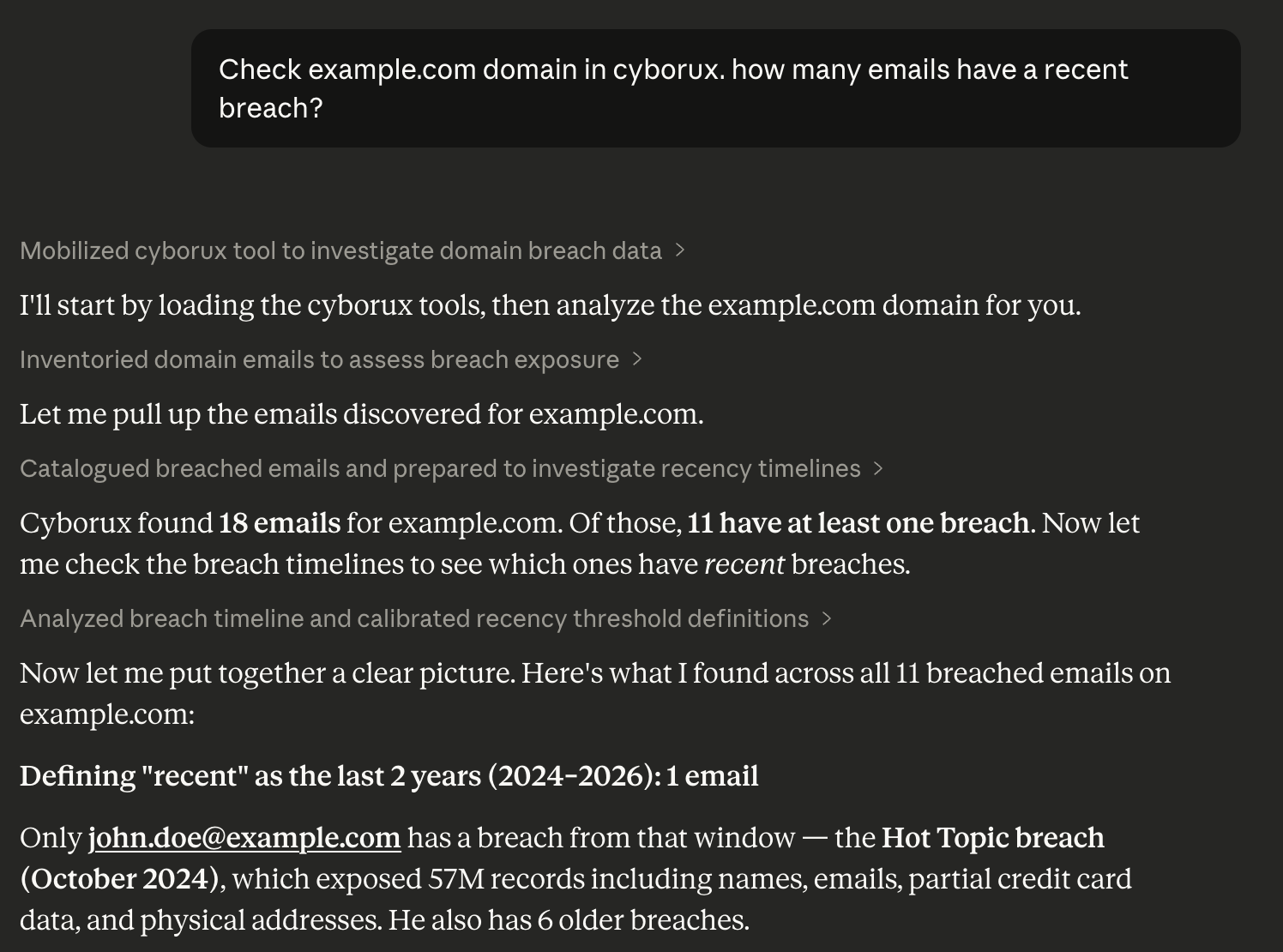
- Retrieves the domain’s overall risk score, entity counts, and security metrics
- Surfaces all discovered email addresses with breach counts and spoofability indicators
- Fetches detailed breach timelines for the most exposed addresses
- Identifies active subdomains with takeover risk and technology fingerprints
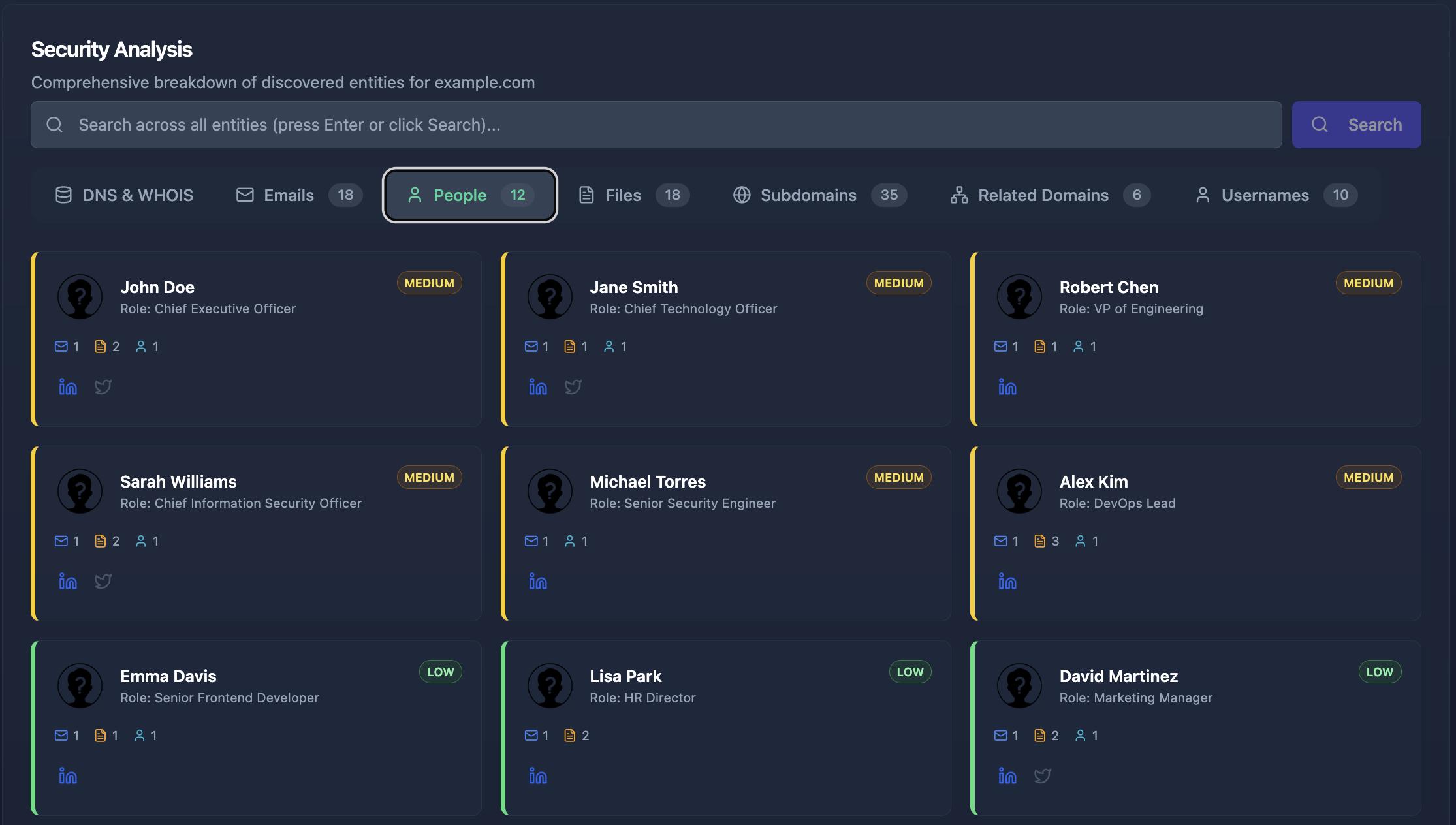
- Discovers exposed employees with role classification and linked exposure data
- Finds publicly accessible documents and analyzes their metadata
- Reveals any internal infrastructure details — IPs, server names, network paths — leaked in document metadata
Each call returns structured data that the AI correlates and presents as a coherent narrative. No tool switching. No CSV exports. No manual correlation.
The output is not a data dump — it is an interpreted analysis:
“clientdomain.com has a high risk score (73/100). The main concerns are: 12 employee emails appear in breach databases, including the CFO and CTO. Three subdomains show takeover vulnerability. The domain’s DMARC policy is set to ‘none’, making it spoofable. I found 4 PDF documents leaking internal network paths and server names.”
In under a minute, you have enough context to walk into a prospect meeting and demonstrate exactly what their exposure looks like — and more importantly, what you can do about it.
Multi-Domain Monitoring for MSSPs
For MSSPs and consultants managing multiple client domains, the AI workflow extends naturally to ongoing attack surface monitoring:
“Compare the current risk posture of client-a.com, client-b.com, and client-c.com. Which one has deteriorated since last month?”
The AI agent queries each domain’s summary, compares security metrics, and highlights changes. New breach exposures, newly discovered subdomains, changed DMARC policies — all surfaced without manually re-running assessment tools across every client.
This is what attack surface management for MSSPs looks like when the monitoring layer is conversational rather than dashboard-dependent. You ask questions in the language of your consulting practice and get answers that map directly to client conversations.
Matching Findings to Your Service Offerings
Raw findings are only half the value. What differentiates a skilled security consultant from a scan-and-dump vendor is the ability to translate technical exposures into specific, actionable service recommendations. Attack surface intelligence connected to AI accelerates both sides of this equation: faster discovery and faster mapping to services.
The Findings-to-Services Framework
Every discovery category from an attack surface assessment maps to one or more consulting service offerings. Here is how the mapping works in practice:
| Finding Category | Example Findings | Service Opportunity |
|---|---|---|
| Email Breaches | 12 emails in breach databases, 3 C-level executives exposed | Credential audit, password policy review, executive protection program |
| Email Spoofability | DMARC set to “none”, missing SPF records | DMARC/SPF/DKIM configuration, email security hardening |
| Subdomain Takeover | 3 dangling CNAME records pointing to decommissioned services | Subdomain cleanup, DNS hygiene audit, takeover remediation |
| Technology Exposure | Outdated CMS instances, exposed admin panels | Vulnerability assessment, patch management, web application security |
| Leaked Files & Metadata | PDFs leaking internal IPs, server names, software versions | Metadata scrubbing, document security policy, DLP implementation |
| People Exposure | Key employees with leaked passwords, excessive social media footprint | Phishing resilience program, executive security awareness, digital footprint reduction |
| TLS/SSL Issues | Expired certificates, weak cipher suites, missing HSTS | TLS hardening, certificate lifecycle management |
The power of this framework is that every finding maps to at least one consulting engagement. When you present a client with their actual exposure data — not hypothetical risks, but their real breached emails, their real vulnerable subdomains, their real leaked files — the conversation shifts from “why should we hire you?” to “when can you start?”
Using AI to Build Proposals from Findings
Here is where the AI workflow delivers its highest value. After the initial reconnaissance, you can ask your AI assistant to help scope the engagement:
“Based on the findings for clientdomain.com, draft a scope summary for a security assessment proposal. Prioritize the most critical exposures and map them to remediation workstreams.”
The AI has all the context from the reconnaissance phase. It knows the breach count, the takeover-vulnerable subdomains, the spoofable email configuration, the leaked files. It can generate a structured proposal outline that prioritizes findings by risk severity and maps each one to a specific deliverable.
This is the difference between spending an afternoon writing a proposal and having a solid draft in minutes. The security consultant’s time shifts from data assembly to expert review and relationship management.
The Complete Consultant Workflow: From Prospect to Deliverable
Let us walk through the full engagement lifecycle as it looks when your AI assistant is connected to an attack surface intelligence platform.
Phase 1: Prospect Qualification (10 minutes)
A prospect reaches out. Before your first call, you run a quick assessment:
“Give me a quick security posture overview for prospect-domain.com. Focus on email security, subdomain hygiene, and any obvious vulnerabilities.”
Within minutes, you have a preliminary risk profile. You know whether this domain has significant exposure (worth pursuing as a client) or a relatively clean posture (limited engagement scope). This qualification step alone saves hours of wasted effort on prospects that do not need your services.
Phase 2: Detailed Reconnaissance (30 minutes)
For qualified prospects, you run a deeper analysis:
“Run a comprehensive attack surface analysis on prospect-domain.com. I need everything — emails with breach history, subdomains with takeover risk, technology fingerprints, people exposure, file metadata, and infrastructure leaks.”
Cyborux performs the full reconnaissance automatically — subdomain enumeration, email discovery, people profiling, file analysis, technology detection, and breach correlation. The AI agent presents the findings in a structured format you can use directly in your proposal.
Phase 3: Proposal Development (1 hour)
With findings in hand, you build the proposal. Ask the AI:
“Based on the analysis of prospect-domain.com, create a prioritized findings summary suitable for a client proposal. Group by severity and include remediation recommendations.”
The AI produces a structured document that maps findings to engagement workstreams. You review, refine, add your pricing, and send. What used to take half a day now takes an hour — and the proposal is grounded in actual data, not generic assessment boilerplate.
Phase 4: Engagement Execution and Reporting
During the engagement, the same AI-powered workflow accelerates the technical work. You can investigate specific findings deeper:
“Show me the complete breach timeline for cfo@clientdomain.com. Which breaches exposed passwords versus only email addresses?”
“What technologies are running on staging.clientdomain.com and admin.clientdomain.com? Are there any known vulnerabilities?”
When it is time to deliver, Cyborux generates professional white-label PDF reports that you can brand with your own consulting logo. These reports include risk scores, findings summaries, and remediation recommendations — ready for client presentation without manual formatting or screenshot-and-paste workflows. Generate them through the dashboard or directly through the MCP integration with a single prompt:
“Generate a PDF security report for clientdomain.com.”
Phase 5: Ongoing Monitoring and Upsell
After the initial engagement, you transition to ongoing monitoring — the recurring revenue engine of any consulting practice:
“What has changed for clientdomain.com since the last assessment? Any new breached emails, new subdomains, or changes in their attack surface?”
Regular monitoring turns one-time assessments into retainer-based relationships. When a new exposure is discovered, you proactively alert the client and propose remediation — before they even know there is a problem. This is the operational model that scales a consulting practice from project-based revenue to predictable monthly income.
See What Your Clients' Exposure Actually Looks Like
Run a full attack surface reconnaissance on any domain in minutes. No tool chaining, no manual correlation. Discover the findings that become your next consulting engagement.
Get Started FreeBuilt for security consultants, MSSPs, and growing organizations.
Setting Up the AI-Powered Consultant Workflow
Getting from zero to a working automated security assessment workflow takes less than five minutes. The technical setup is minimal because the hard part — data collection, correlation, and intelligence — is handled by Cyborux’s attack surface management engine.
What You Need
- A Cyborux account — Sign up and create an API token (starts with
cbrx_) - An MCP-compatible AI client — Claude Desktop, Claude Code, or Cursor
- Node.js installed (the MCP server runs as an npm package)
Configuration
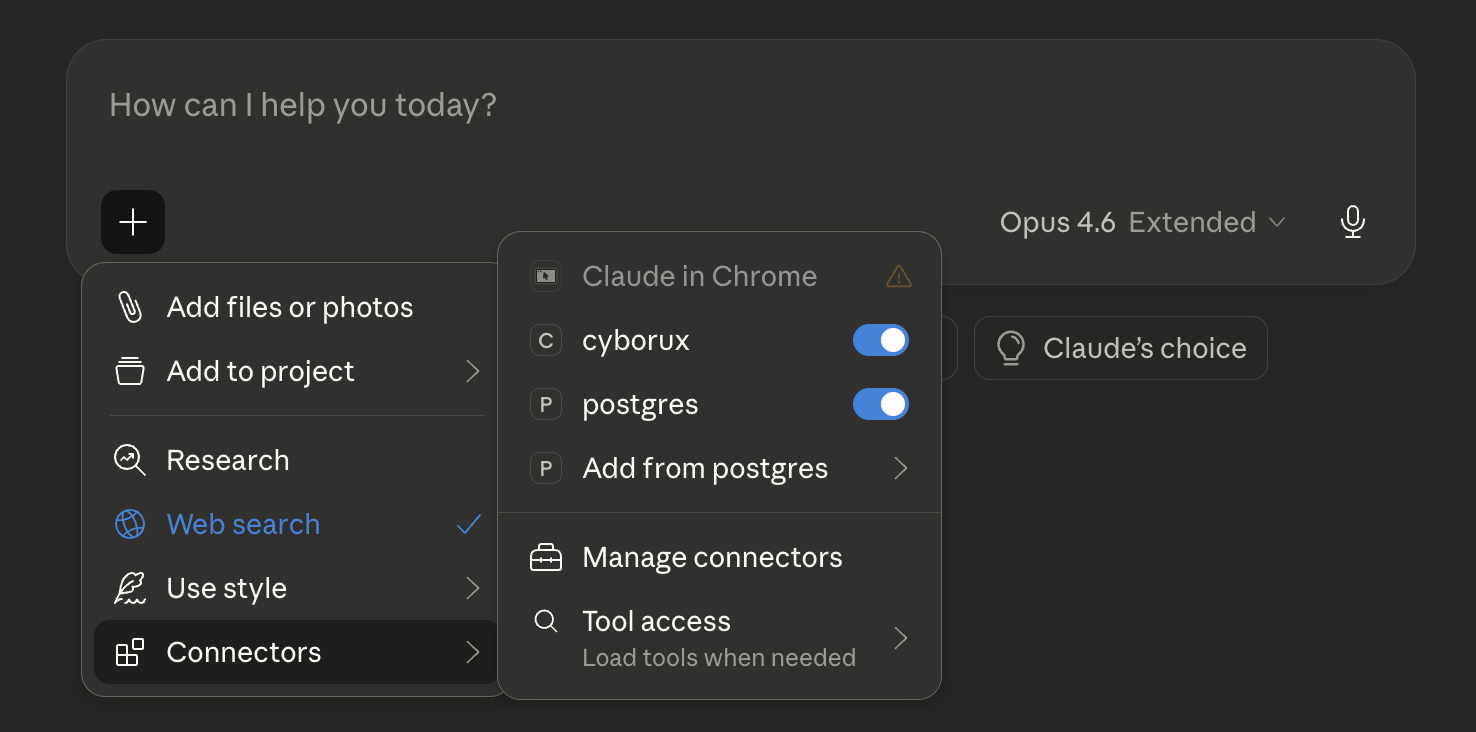
Add the Cyborux MCP server to your AI client. For Claude Desktop, open Settings → Developer → Edit Config and add:
{
  "mcpServers": {
    "cyborux": {
      "command": "npx",
      "args": ["-y", "@cyborux/mcp-server"],
      "env": {
        "CYBORUX_API_KEY": "cbrx_your_token_here"
      }
    }
  }
}
For Claude Code:
claude mcp add cyborux \
  -e CYBORUX_API_KEY=cbrx_your_token_here \
  -- npx -y @cyborux/mcp-server
Restart your client. You now have access to 22 cybersecurity tools through natural language. For the complete setup guide with additional client configurations and detailed tool documentation, see The Complete MCP Integration Guide.
First Steps for Security Consultants
Once configured, start with your own domain to see the workflow in action:
“Analyze the attack surface for mydomain.com. What would an attacker see?”
Then try a prospect domain you are currently evaluating:
“Compare the security posture of prospect-a.com and prospect-b.com. Which one has more exposure?”
Then go deeper on specific findings:
“Show me all employees at prospect-a.com whose emails appear in breach databases. Who holds security-critical roles?”
Each interaction demonstrates the speed difference. What used to take hours of manual tool chaining happens in seconds through conversation. The AI handles the tool orchestration; you handle the interpretation and client relationship.
How Cyborux Helps Security Consultants
Cyborux is purpose-built for the workflow described in this guide. It combines automated OSINT reconnaissance and attack surface management with an AI-native integration layer that makes security data accessible through natural language.
What You Get
- Automated attack surface analysis — Enter a domain and Cyborux discovers subdomains, emails, people, files, URLs, usernames, related domains, and infrastructure leaks. The entire OSINT and asset discovery pipeline runs in the background.
- 22 MCP tools — Every piece of intelligence is accessible through natural language via the Cyborux MCP server. Ask questions, investigate findings, generate reports — all conversationally.
- Risk scoring — Every domain, subdomain, email, and person receives a calculated risk score based on multiple factors. Findings are pre-prioritized so you focus on what matters.
- White-label PDF reports — Generate professional security reports branded with your consulting logo. Use them as standalone deliverables or appendices in your proposal documents. Available through the dashboard or the MCP integration.
- Multi-domain monitoring — Track multiple client domains from a single dashboard. Get notified when the attack surface changes.
- Deep vulnerability scanning — Schedule WordPress vulnerability scans and other targeted assessments for specific subdomains.
Why It Works for Consultants Specifically
Most security platforms are built for in-house security teams. Cyborux is different because:
- Multi-domain by design — Manage dozens of client domains without separate tool instances
- AI-native — The MCP integration is not an afterthought. It is the primary interface for power users who want to move fast
- Pre-correlated intelligence — Findings are automatically linked across entities. An email is linked to the person it belongs to, the breaches it appears in, and the files where it was found
- Client-ready outputs — White-label PDF reports, risk scores, and structured data designed for client communication, not just internal analysis
Building a Scalable Security Consulting Practice
The economics of security consulting workflow automation are straightforward. The bottleneck in most consulting practices is not technical expertise — it is the time spent on repetitive data gathering, tool operation, and report assembly. An attack surface intelligence platform connected to your AI assistant removes these bottlenecks and shifts the consultant’s time toward the activities that drive revenue: client relationships, expert analysis, and strategic advisory.
The Leverage Effect
Consider the math:
- Without automation: 2-4 hours of manual recon per prospect or client check-in
- With Cyborux + AI: 10-30 minutes per domain, including investigation and draft documentation
- Time recovered: 15-30 hours per month for a practice managing 10-20 domains
- Revenue impact: Those recovered hours translate directly to additional client capacity or deeper engagement delivery
This is not about replacing the consultant. It is about removing the operational ceiling that prevents talented security professionals from serving more clients at a higher quality level.
From One-Time Assessments to Recurring Revenue
The most significant business impact is the transition from project-based to retainer-based revenue. Manual reconnaissance makes ongoing monitoring impractical — there are not enough hours to re-assess every client monthly. AI-powered attack surface management makes continuous monitoring trivially easy, turning it into a service offering with recurring monthly revenue.
Every retainer client represents predictable income. Every proactive alert you send — “We detected a new breach exposure for your CFO’s email” — reinforces the value of the relationship and makes the retainer renewal automatic.
Common Questions
How is this different from running OSINT tools manually?
The individual techniques are the same — subdomain enumeration, email harvesting, breach checking, technology fingerprinting. What changes is the integration and interpretation layer. Instead of running each tool separately, exporting data, and correlating manually, the AI agent handles orchestration and presents correlated findings. The time savings are typically 80-90% compared to manual workflows.
Do I need programming skills to use the MCP integration?
No. The MCP integration uses natural language. You type questions in English and get structured answers. The setup requires editing a JSON configuration file (detailed in the MCP integration guide), but no code is involved in daily use.
Can I use findings from Cyborux in client proposals and reports?
Yes. Cyborux includes white-label PDF report generation through both the dashboard and the MCP integration. You can add your consulting logo and brand the reports as your own. Use them as standalone deliverables or appendices in your proposal documents.
How does ongoing monitoring work for multiple clients?
Each domain you analyze is tracked independently. You can monitor changes through the dashboard or by asking your AI assistant for updates across all your monitored domains. Risk scores update automatically when new exposures are discovered.
Is this suitable for penetration testing reconnaissance?
Yes. The reconnaissance data from Cyborux — subdomains, emails, technology fingerprints, file metadata, related domains — maps directly to the information-gathering phase of a penetration test. The OSINT and asset discovery findings inform where to focus active testing and help identify the most promising attack vectors before hands-on work begins.
What about client data privacy?
Cyborux analyzes only publicly accessible information — the same data an attacker would find. No scanning, no exploitation, no intrusive probes. Analysis is performed on external-facing assets using passive and semi-passive techniques. All data is stored securely and accessible only to authorized users.
Which AI clients support the Cyborux MCP server?
Claude Desktop, Claude Code, Cursor, and any client that supports the Model Context Protocol. Since MCP is an open standard adopted by all major AI platforms, the list of compatible clients continues to grow. See the integration guide for setup instructions for each client.
Conclusion
The security consulting industry is at an inflection point. The consultants who connect attack surface intelligence to their AI workflows are not just working faster — they are working differently. They qualify prospects in minutes instead of hours. They scope engagements with real data instead of generic templates. They monitor client attack surfaces continuously instead of sporadically. They scale their practice without scaling their team.
The technical barrier to entry is near zero. A Cyborux account, a five-minute MCP configuration, and your existing AI assistant are all you need to start. The first time you type a prospect’s domain into Claude and get a comprehensive attack surface analysis back in thirty seconds, you will not go back to the manual workflow.
The question is not whether AI will transform security consulting. It is whether you adopt it before your competitors do.
Get started with Cyborux and see what your clients’ exposure actually looks like.