Web Security Best Practices: 15 Proven Ways to Protect Your Website in 2026
A development team pushes a routine update to production on a Friday afternoon. The deployment goes smoothly. Monitoring dashboards stay green. Everyone logs off for the weekend.
By Monday morning, 40,000 user records have been exfiltrated through an API endpoint that accepted unsanitized input. The breach traces back to a single missing validation check — one that would have taken fifteen minutes to implement.
This is not a hypothetical scenario. According to Verizon’s 2025 Data Breach Investigations Report, web application attacks remain the leading vector for confirmed data breaches, responsible for more than 25% of all incidents. The median time to exploit a newly disclosed vulnerability has dropped below 48 hours. And the cost of a breach continues to climb — IBM’s Cost of a Data Breach Report pegged the 2025 global average at $4.88 million.
The uncomfortable reality is that most web security failures are preventable. Not with expensive enterprise tools or dedicated security teams, but with disciplined application of fundamental web security best practices that every development team should treat as non-negotiable.
This guide walks through fifteen actionable practices — organized from infrastructure through application logic to operational security — that collectively reduce your attack surface and make your web applications dramatically harder to compromise.
Why Web Security Demands Attention in 2026
The threat landscape has shifted in ways that make historical approaches insufficient.
Attack surfaces have expanded. Modern web applications are no longer monolithic servers returning HTML. They are distributed systems — microservices, serverless functions, third-party APIs, CDN edge workers, client-side SPAs making dozens of API calls. Every integration point, every exposed subdomain, every forgotten staging environment creates potential entry points.
Automation has lowered the barrier. Attackers no longer need deep technical expertise. Automated scanners probe the entire IPv4 space in hours. Credential-stuffing tools test billions of leaked password combinations. AI-powered reconnaissance can map an organization’s external attack surface faster than most security teams can audit it.
Regulatory consequences have intensified. GDPR fines have crossed the €1 billion mark. The SEC now requires public companies to disclose material cybersecurity incidents within four business days. California’s CPRA, Brazil’s LGPD, and similar regulations worldwide have turned security failures into existential business risks.
The silver lining: the same fundamentals that prevented breaches a decade ago still work today — they just need to be applied more consistently and at greater depth.
The 15 Web Security Best Practices
1. Enforce HTTPS Everywhere with Proper TLS Configuration
This is the foundation. Every page, every API endpoint, every asset served by your domain must use HTTPS. Not just login pages — everything.
But HTTPS alone is insufficient. The strength of your transport security depends on the TLS configuration behind it: protocol versions, cipher suites, certificate chain validity, and header policies.
A misconfigured TLS setup does not just lower your security grade — it signals to attackers that deeper vulnerabilities likely exist. We covered this in detail in our guide on TLS/SSL security assessment and how to check, fix, and improve your grade.
What to do: Run a TLS assessment against every domain and subdomain you operate. Fix anything below an A grade. Automate certificate renewal. Monitor for expiration.
2. Implement Security Headers
HTTP security headers are one of the highest-impact, lowest-effort defenses available. They instruct browsers to enforce security policies that prevent entire categories of attacks.
Content Security Policy deserves special attention. A well-crafted CSP eliminates most cross-site scripting vulnerabilities without changing a single line of application code. Start strict and loosen only as needed — never the reverse.
What to do: Add all six headers to your web server or application middleware. Test with securityheaders.com. Iterate on your CSP until it passes without breaking functionality.
3. Validate and Sanitize All Input — Server-Side
Every piece of data that enters your application from an external source is a potential attack vector. Form submissions, URL parameters, HTTP headers, file uploads, API payloads, webhook callbacks — all of it.
Client-side validation improves user experience. Server-side validation prevents exploitation. They serve different purposes and one cannot replace the other.
The rules are straightforward:
- Validate type, length, format, and range before processing any input
- Use allowlists (accepted values) rather than blocklists (rejected patterns)
- Parameterize all database queries — never concatenate user input into SQL strings
- Encode output based on context (HTML, JavaScript, URL, CSS)
- Reject unexpected input rather than trying to clean it
# Dangerous — SQL injection vulnerability
query = f"SELECT * FROM users WHERE email = '{user_input}'"

# Safe — parameterized query
query = "SELECT * FROM users WHERE email = :email"
result = db.execute(query, {"email": user_input})
SQL injection has been on the OWASP Top 10 for over two decades. It remains there because developers keep building queries with string concatenation. Parameterized queries are not a best practice — they are a bare minimum.
4. Implement Strong Authentication
Weak authentication is an open door. Modern web application security best practices demand layered authentication controls that go beyond passwords.
Password requirements:
- Minimum 12 characters with no maximum limit
- Check against known breached passwords (use the Have I Been Pwned API or similar)
- Hash with bcrypt, scrypt, or Argon2id — never MD5 or SHA-1
- Use unique, random salts per password
Multi-factor authentication (MFA):
- Offer MFA for all accounts, require it for admin access
- Prefer authenticator apps (TOTP) or hardware keys (WebAuthn/FIDO2) over SMS
- Implement backup codes for account recovery
Session management:
- Generate cryptographically random session tokens
- Set
HttpOnly,Secure, andSameSite=Strictflags on session cookies - Implement absolute and idle session timeouts
- Invalidate sessions on logout and password change
Attackers routinely use exposed employee emails discovered through OSINT to launch targeted credential-stuffing campaigns. If those employees reuse passwords across services — and breach data shows that roughly 65% do — weak authentication becomes a direct path into your systems.
5. Apply the Principle of Least Privilege
Every component in your system should have the minimum permissions necessary to function. No more.
This applies at every layer:
- Database users: Application database accounts should not have
DROPorGRANTprivileges. Use separate accounts for migrations and runtime queries. - API keys: Scope keys to specific actions and resources. Rotate them regularly.
- Service accounts: Avoid shared credentials between services. Each service gets its own identity.
- File system: Web server processes should not have write access to application directories.
- Cloud IAM: Use role-based access with time-limited credentials rather than static keys.
When an attacker compromises a component — and eventually, something will be compromised — least privilege determines the blast radius. A compromised API key scoped to read-only access on a single resource is a contained incident. A compromised key with admin access to your entire cloud account is a catastrophe.
6. Protect Against Cross-Site Scripting (XSS)
Cross-site scripting remains the most prevalent web application vulnerability. An attacker injects malicious scripts into pages viewed by other users, enabling session hijacking, credential theft, and defacement.
Three types exist, and you need defenses against all of them:
- Stored XSS: Malicious input persisted in your database and rendered to other users
- Reflected XSS: Malicious input reflected back from the server in the response
- DOM-based XSS: Malicious input processed entirely in client-side JavaScript
Defenses:
- Use a framework that auto-escapes output by default (React, Angular, Vue all do this)
- Never use
innerHTML,dangerouslySetInnerHTML, orv-htmlwith user-controlled data - Implement a strict Content Security Policy (see Practice #2)
- Sanitize rich-text input with a library like DOMPurify — not with regex
- Set
HttpOnlyflag on session cookies to prevent JavaScript access
// Dangerous — XSS vulnerability
element.innerHTML = userComment;

// Safe — text content (no HTML parsing)
element.textContent = userComment;

// Safe — React handles escaping automatically
return <p>{userComment}</p>;
7. Secure Your APIs
APIs have become the primary attack surface for modern web applications. They often expose more functionality than the user interface and receive less security scrutiny.
Web API security best practices:
- Authenticate every request: Use OAuth 2.0 with short-lived access tokens and refresh token rotation
- Rate limit aggressively: Implement per-user and per-IP rate limiting on all endpoints, especially authentication
- Validate request bodies: Use schema validation (JSON Schema, Zod, Pydantic) to reject malformed requests before processing
- Version your APIs: Breaking changes in unversioned APIs create security gaps during transitions
- Limit response data: Return only the fields the client needs — over-exposure of data is a leading API vulnerability
- Log and monitor: Track authentication failures, unusual access patterns, and error rates
# FastAPI example — schema validation + rate limiting
from pydantic import BaseModel, EmailStr, Field

class UserCreate(BaseModel):
    email: EmailStr
    name: str = Field(min_length=1, max_length=100)
    password: str = Field(min_length=12, max_length=128)

@app.post("/api/users", status_code=201)
@limiter.limit("5/minute")
async def create_user(user: UserCreate, request: Request):
    # Input is already validated by Pydantic
    # Process the request...
The OWASP API Security Top 10 identifies Broken Object Level Authorization (BOLA) as the number one API vulnerability. This is when API endpoints expose resources by internal ID without verifying the requesting user has access. Always validate authorization at the object level, not just at the endpoint level.
8. Manage Dependencies Responsibly
Your application code might be secure, but what about the hundreds of packages it depends on? Supply chain attacks have surged, with malicious packages appearing in npm, PyPI, and other registries at accelerating rates.
- Audit dependencies regularly: Run
npm audit,pip-audit, orsnyk testas part of your CI pipeline - Pin versions: Use lock files (
package-lock.json,poetry.lock) and pin to specific versions - Monitor for vulnerabilities: Subscribe to security advisories for your critical dependencies
- Minimize dependencies: Every package is a trust decision — fewer dependencies mean fewer attack vectors
- Update promptly: When a security patch is released, apply it within days, not months
Knowing exactly what technologies your application exposes is the first step. Outdated frameworks, unpatched libraries, and revealed version numbers give attackers a roadmap. Keep your stack current and your version information private.
9. Implement Proper Error Handling
Error messages are a reconnaissance tool. Detailed stack traces, database error messages, and internal paths leak implementation details that help attackers map your application.
Production error handling rules:
- Return generic error messages to users: “Something went wrong” — not the stack trace
- Log detailed errors server-side for debugging
- Use structured error responses with consistent formats
- Never expose database names, table names, or query structures
- Remove debug mode and development error pages in production
- Implement custom error pages for 404, 403, 500
# Dangerous — leaks internal details
@app.exception_handler(Exception)
async def handle_error(request, exc):
    return JSONResponse({"error": str(exc)})  # Exposes internals

# Safe — generic response with server-side logging
@app.exception_handler(Exception)
async def handle_error(request, exc):
    logger.error(f"Unhandled error: {exc}", exc_info=True)
    return JSONResponse(
        status_code=500,
        content={"error": "An internal error occurred"}
    )
10. Secure File Uploads
File uploads are one of the most dangerous features to implement. A single mistake can allow remote code execution, cross-site scripting, or denial of service.
File upload security:
- Validate file types on the server using magic bytes (file signatures), not just extensions
- Rename uploaded files — never use the original filename in storage paths
- Store uploads outside the web root — uploaded files should never be directly executable
- Set size limits to prevent denial-of-service via large uploads
- Scan for malware using ClamAV or a cloud-based scanner
- Serve uploads from a separate domain to isolate any XSS in uploaded HTML/SVG files
- Strip metadata from images to prevent information leakage
import magic

ALLOWED_TYPES = {"image/jpeg", "image/png", "image/webp", "application/pdf"}
MAX_SIZE = 10 * 1024 * 1024  # 10MB

async def validate_upload(file: UploadFile):
    # Check size
    content = await file.read()
    if len(content) > MAX_SIZE:
        raise HTTPException(400, "File too large")

    # Validate type using magic bytes, not extension
    mime_type = magic.from_buffer(content, mime=True)
    if mime_type not in ALLOWED_TYPES:
        raise HTTPException(400, "File type not allowed")

    # Generate safe filename
    safe_name = f"{uuid4()}.{mime_type.split('/')[-1]}"
    return content, safe_name
11. Use CSRF Protection
Cross-Site Request Forgery tricks authenticated users into performing unintended actions. If your user is logged into your banking app and visits a malicious page, that page can submit a transfer request using the user’s active session.
CSRF defenses:
- Use anti-CSRF tokens: Generate a unique, unpredictable token per session and validate it on every state-changing request
- Set
SameSite=StrictorSameSite=Laxon session cookies to prevent cross-origin sending - Verify the
OriginandRefererheaders on state-changing requests - Use custom request headers for API calls — browsers enforce CORS preflight for non-standard headers
Modern frameworks include CSRF protection out of the box. Do not disable it. If you are building a REST API consumed by your own frontend, combine SameSite cookies with CORS restrictions for strong protection.
Securing the Perimeter: Infrastructure and Monitoring
The practices above secure your application code. The next four address the infrastructure and processes around it — the perimeter that determines whether attackers can even reach your application’s vulnerabilities.
12. Monitor Your Attack Surface Continuously
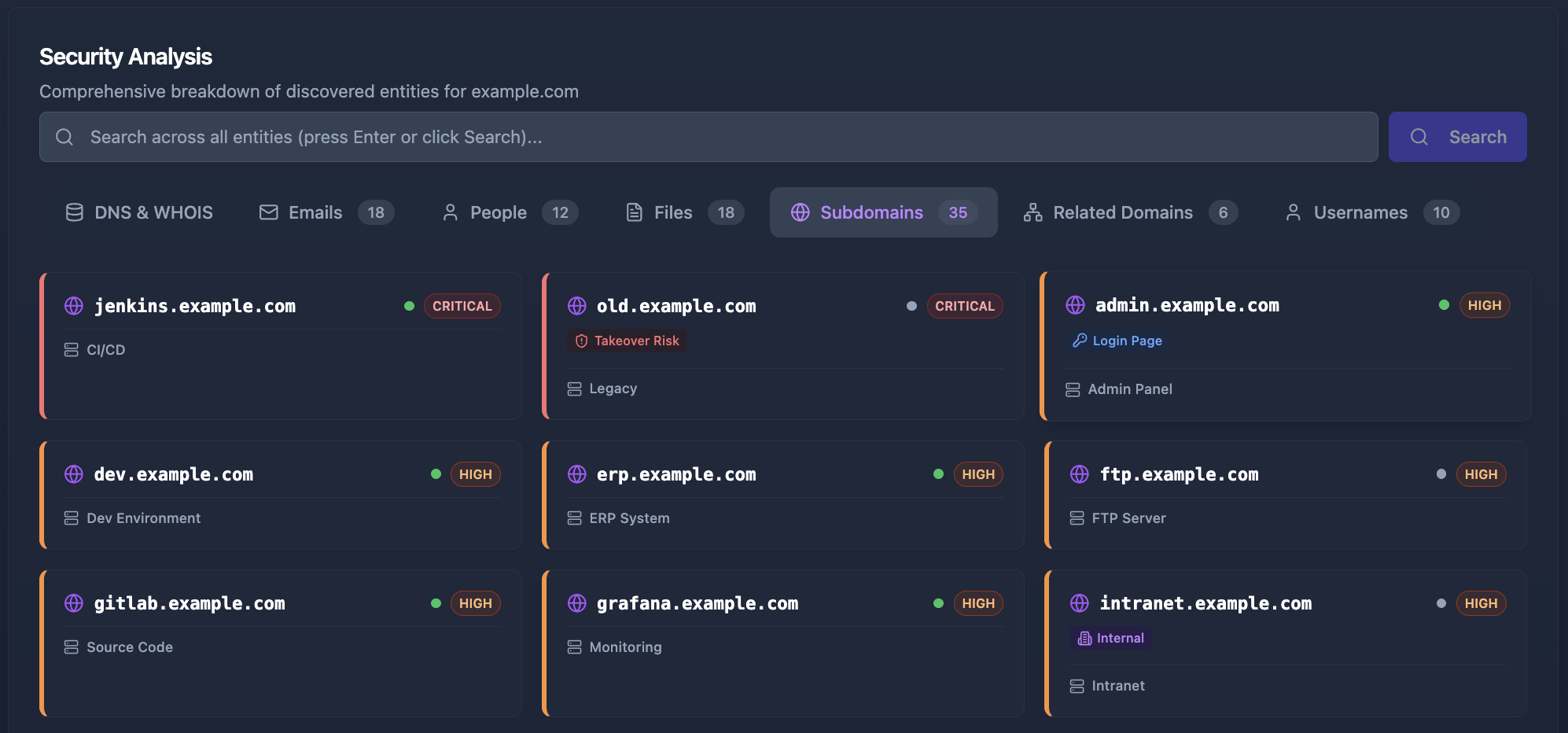
You cannot protect what you do not know exists. Shadow IT, forgotten subdomains, test environments left public, staging servers with production data, exposed admin panels — these are the entry points attackers find first because they are the ones you have forgotten about.
An external attack surface management strategy requires continuous discovery:
- Enumerate all subdomains using Certificate Transparency logs, DNS brute-forcing, and passive reconnaissance
- Track exposed services across all IP addresses and ports
- Monitor for credential leaks in breach databases and paste sites
- Discover exposed employee information that could enable social engineering
- Identify technology stacks across all assets to track vulnerability exposure
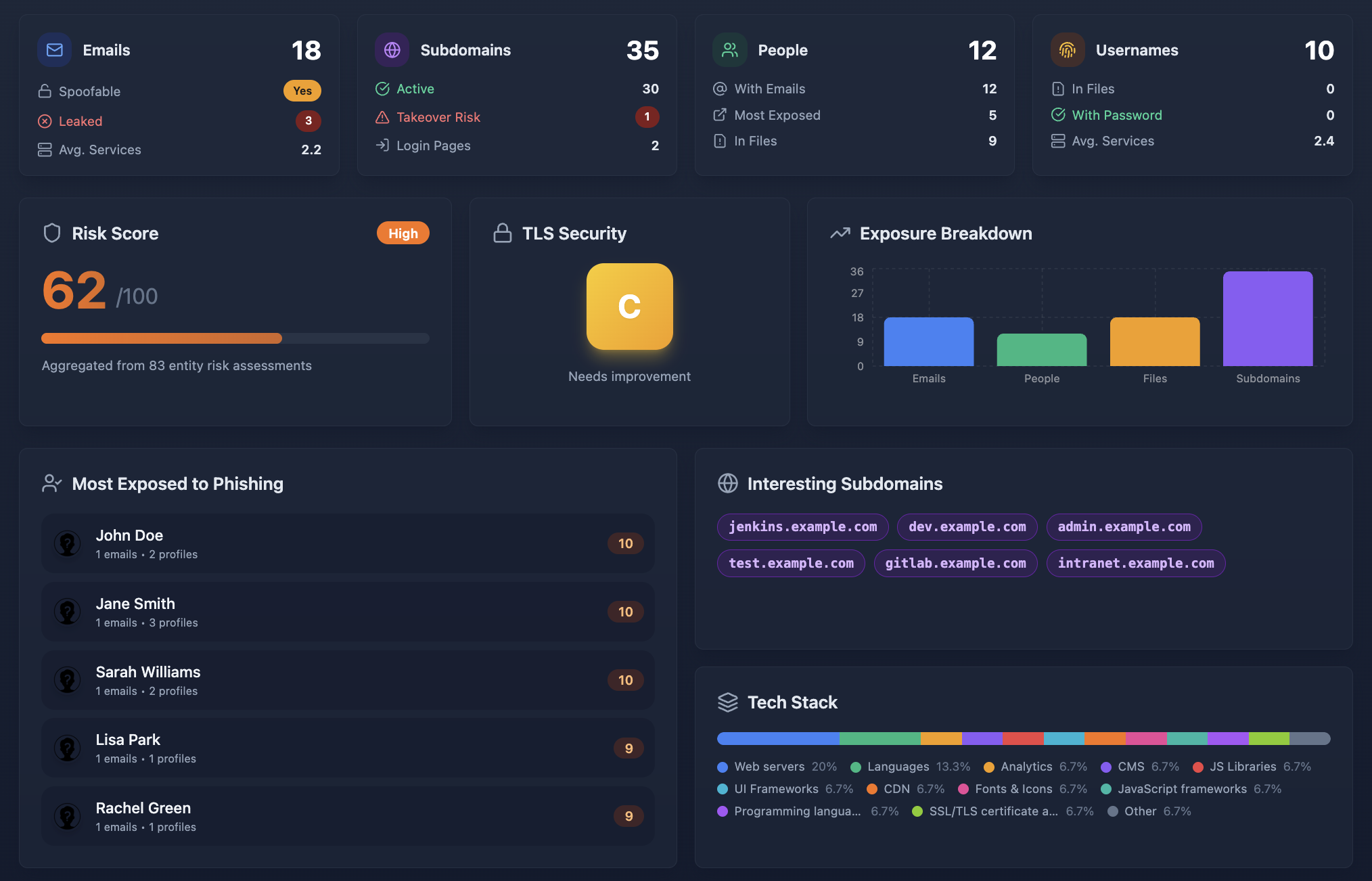
Manual reconnaissance is slow and incomplete. You find what you look for, but miss what you do not think to check. This is where automated tools become essential — they surface the forgotten subdomains, the exposed email addresses, and the revealed technology versions that create compound risk.
Cyborux automates this entire discovery process. Enter a domain and receive a comprehensive map of your external attack surface — subdomains, emails, people, files, technology stacks, TLS configuration, and email authentication status. What would take a security analyst hours of manual investigation is completed in minutes.
13. Harden Email Authentication
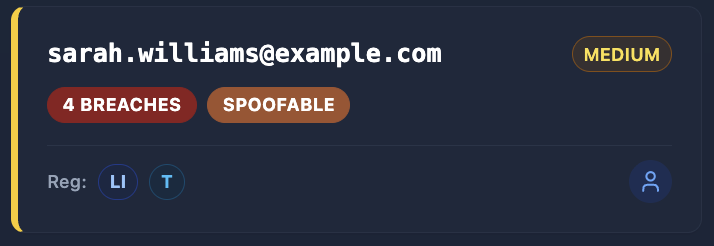
Email is the most common vector for initial compromise. Phishing emails spoofing your domain to target your employees, customers, or partners can bypass technical controls entirely by exploiting human trust.
Three DNS records work together to prevent email spoofing:
- SPF (Sender Policy Framework): Declares which mail servers can send on behalf of your domain
- DKIM (DomainKeys Identified Mail): Cryptographically signs outgoing messages to prove they have not been altered
- DMARC (Domain-based Message Authentication): Tells receiving servers what to do with messages that fail SPF/DKIM checks
Without all three properly configured, anyone can send emails that appear to come from your domain. We covered the full implementation in our guide on DMARC, SPF, and DKIM for email spoofing prevention.
How exposed is your domain?
Cyborux scans your domain for subdomains, exposed emails, weak TLS, missing email authentication, technology leaks, and more. One domain, one click — full external attack surface visibility in minutes.
Scan Your Domain14. Log, Monitor, and Respond
Security without visibility is guesswork. You need to know when something goes wrong — and ideally before it escalates.
What to log:
- Authentication events (successful and failed logins, password resets, MFA enrollment)
- Authorization failures (access denied responses, privilege escalation attempts)
- Input validation failures (rejected requests may indicate probing)
- Administrative actions (user creation, permission changes, configuration updates)
- API rate limit hits and throttled requests
How to monitor:
- Aggregate logs in a centralized system (ELK stack, Datadog, CloudWatch)
- Set alerts for anomalous patterns — a spike in failed logins from a single IP, requests to non-existent endpoints, unusual data export volumes
- Review logs regularly, not just when incidents occur
- Maintain an incident response plan and practice it
What not to log:
- Passwords, tokens, or credentials — even in error messages
- Full credit card numbers or other sensitive PII
- Session tokens in URL parameters (these end up in server logs, proxy logs, and browser history)
15. Reduce Your Digital Footprint
Every piece of information publicly available about your organization can be used against it. WHOIS records revealing administrator emails. Job postings describing your tech stack. GitHub repositories with hardcoded credentials. LinkedIn profiles identifying key IT personnel. DNS records exposing internal naming conventions.
Reducing your organization’s digital footprint is an ongoing practice, not a one-time cleanup. It requires understanding what OSINT techniques attackers use and proactively minimizing the information available to them.
Practical steps:
- Enable WHOIS privacy on all domain registrations
- Remove version numbers from HTTP headers and error pages
- Audit GitHub for accidentally committed secrets (use tools like
trufflehogorgitleaks) - Review what employee information is publicly discoverable
- Remove or restrict access to exposed internal documentation
- Monitor for leaked credentials in breach databases
This is precisely the kind of reconnaissance Cyborux performs — but from the defender’s perspective. By running the same discovery process that an attacker would use, you see your organization the way they see it. Exposed emails, spoofable domains, discoverable employees, revealed technologies — Cyborux surfaces it all so you can fix it before it is exploited.
Putting It All Together: A Web Security Checklist
Implementing all fifteen practices at once can feel overwhelming. Here is a prioritized approach based on impact and effort:
Start with the Critical tier — these are the practices where absence is most likely to lead to a breach. Then layer in the High-priority items, which often require only configuration changes. The Medium tier addresses specific attack vectors that become relevant as your application matures. The Ongoing tier represents continuous security posture management — the kind of work that never stops.
Notice that Attack Surface Monitoring sits in the “Ongoing” row with medium effort — but tools like Cyborux reduce that effort dramatically. What traditionally requires hours of manual reconnaissance becomes a single domain input with automated, continuous monitoring. The effort drops to near-zero while the impact stays very high.
Common Web Security Mistakes to Avoid
Even teams that understand security best practices fall into patterns that undermine their efforts. Here are the mistakes we see most often:
Relying on client-side security. Disabling buttons in the UI does not prevent attackers from sending direct API requests. JavaScript validation does not stop someone using curl. Every security control must be enforced server-side.
Security through obscurity. Assuming attackers will not find your admin panel at /admin-secret-panel-2024 is not a strategy. Automated scanners and OSINT reconnaissance will find it. Use proper authentication and authorization instead.
Ignoring subdomains. Your main domain might have an A+ TLS grade and every security header configured. But that staging subdomain running on port 8080 with basic auth and a self-signed certificate? That is where the breach will start. Security must extend to every subdomain and every service.
Treating security as a phase. Security is not something you “do” at the end of a project. It is a property of how you build software. Security reviews after development is complete find vulnerabilities that are expensive to fix. Security integrated into development prevents them from being introduced.
Not knowing your attack surface. This is the most fundamental mistake. You cannot secure what you cannot see. Organizations routinely discover assets during incident response that should have been discovered during proactive security assessments. Continuous attack surface monitoring is not optional — it is the foundation upon which all other practices depend.
The Role of Automation in Web Security
Manual security is not scalable. Development teams ship code daily. Infrastructure changes hourly. New subdomains, new services, new integrations appear constantly. Manual auditing cannot keep pace.
Automation addresses this gap at multiple levels:
- Static analysis (SAST): Scans source code for vulnerabilities before deployment
- Dynamic analysis (DAST): Tests running applications for exploitable vulnerabilities
- Software composition analysis (SCA): Monitors dependencies for known vulnerabilities
- Infrastructure as code scanning: Validates cloud configurations against security benchmarks
- External attack surface management: Continuously discovers and monitors internet-facing assets
Cyborux focuses on the last category — giving you the attacker’s perspective of your organization. By automating the reconnaissance process, it provides continuous visibility into what is exposed, what is misconfigured, and what is vulnerable. No agents to install, no infrastructure to manage. Enter a domain, and the platform handles subdomain enumeration, email discovery, technology detection, TLS assessment, and email authentication analysis automatically.
The result is a dashboard that shows you exactly what an attacker would find — before they find it.

Frequently Asked Questions
What are the most important web security best practices for small businesses?
Start with the fundamentals: enforce HTTPS with proper TLS configuration, implement security headers, use parameterized queries, and enable multi-factor authentication on all admin accounts. These four practices prevent the majority of web attacks and require minimal investment. Beyond that, monitor your external attack surface with a tool like Cyborux to understand what information about your organization is publicly exposed — small businesses often have unknown subdomains, exposed employee emails, and misconfigured DNS records that create easy entry points for attackers.
How often should I review my web application security?
Continuously for automated checks, quarterly for manual reviews. Automated tools (dependency scanners, SAST, attack surface monitoring) should run on every deployment or at minimum daily. Manual security reviews — code audits, penetration testing, architecture assessments — should happen quarterly for critical applications and at least annually for all production systems. Additionally, review your security posture after every significant infrastructure change, dependency update, or new integration.
What is the difference between web security and web application security?
Web security is the broader discipline covering everything from network infrastructure and server hardening to DNS configuration and email authentication. Web application security focuses specifically on the code, logic, and data handling within the application itself — input validation, authentication, authorization, session management, and API security. In practice, you need both. A perfectly coded application deployed on a misconfigured server with weak TLS and spoofable email is still vulnerable.
How do I know if my website has been compromised?
Common indicators include: unexpected changes to files or database records, unfamiliar user accounts with elevated privileges, unusual outbound traffic patterns, search engines flagging your site for malware, unexplained spikes in server resource usage, and customer reports of phishing emails appearing to come from your domain. However, sophisticated breaches can go undetected for months. Proactive monitoring — including regular log review, file integrity monitoring, and external attack surface assessments — is far more reliable than waiting for symptoms.
What is external attack surface management and why does it matter for web security?
External attack surface management (EASM) is the continuous process of discovering, cataloging, and monitoring all internet-facing assets associated with your organization — domains, subdomains, IP addresses, open ports, exposed services, email addresses, and technology stacks. It matters because attackers perform this same reconnaissance before targeting you. By maintaining visibility into your own external footprint, you can identify and remediate exposures before they are exploited. Tools like Cyborux automate this process, providing the attacker’s perspective of your organization without requiring manual OSINT investigation.
Are web security best practices different for APIs versus traditional web applications?
The core principles are the same, but APIs have unique considerations. APIs typically lack a browser-enforced UI layer, so defenses like CSRF tokens and CSP are less relevant, while authentication, authorization, and input validation become even more critical. APIs also tend to expose more granular data access patterns, making Broken Object Level Authorization the most common API vulnerability. Rate limiting, request schema validation, and response filtering are essential for API security. Traditional web applications, meanwhile, must additionally address browser-specific threats like XSS, clickjacking, and cookie security.
Conclusion
Web security is not a product you purchase or a certification you achieve. It is a set of practices you embed into how your team designs, builds, deploys, and monitors software. The fifteen practices in this guide are not exotic or cutting-edge — they are the fundamentals that separate organizations that get breached from those that do not.
Start with what matters most: HTTPS with strong TLS, server-side input validation, robust authentication, and proper security headers. Then extend to API security, dependency management, and infrastructure hardening. And undergirding all of it — know your attack surface. You cannot defend what you cannot see.
The gap between attackers and defenders is not one of capability. It is one of visibility. Attackers invest heavily in reconnaissance because it works — finding the forgotten subdomain, the exposed email, the outdated library is almost always easier than crafting a novel exploit.
Close that gap. Run the same reconnaissance against yourself. Enter your domain into Cyborux and see what the attacker sees — subdomains, emails, people, files, technologies, TLS grades, and email authentication status. In minutes. No configuration, no agents, no infrastructure.
Then fix what you find. That is web security in practice.